A web hosting service is one which allows people to have their own web space and create a website. A free web hosting service is a web hosting service that is free, usually where one can earn by placing advertisements. Free web hosts usually provide a sub-domain (yoursite.example.com) or a directory (www.example.com/~yourname). In contrast, paid web hosts will usually provide a second-level domain along with the hosting (www.yourname.com). Many free hosts do allow use of separately-purchased domains. Rarely, a free host may also operate as a domain name registrar.
Another type of web hosting service is the one which has an annual or a monthly charge. If someone pays the desired amount by a web host then they get the desired domain name. By reading this you will wonder that these web hosting companies earn a lot. I f you think so, then you are absolutely correct, because this is a multi-million dollar industry. Their main aim is to provide the users the maximum benefit. The few of the most promising web hosts that are present in the market are InMotion, WebHostingPad, Globat etc.
Now after hearing the money factor you must be wondering how to venture into this business. Well to venture in this business there are some tips that one should follow. If you want to make good money from the internet then this is the work to do. To understand how to make this work successful one should go through some web hosting articles or web hosting tutorials which are usually availlable on the intenet. Actually these tutorials are quite easy to follow and this work is quite easy to implement, so in other words Web Hosting is an easy source of income from the internet.
Thursday, November 27, 2008

Wednesday, November 26, 2008
Want to make Vista shut down faster? - Read this !!!
When you use Windows Vista for the first few days you see that the shut down time is not really a problem. But as time passes by you will see that slowly and gradually the shut down time of Windows Vista increases considerably and takes a toll on your patience.
So, here is a Registry tweak that helps make your Vista experience a lot better.
Step 1: Open the Registry Editor by going to the Start Menu, and typing regedit in the Search bar and then pressing Enter.

Step 2: Within the registry editor navigate to the key "HKEY_LOCAL_MACHINE\SYSTEM\CurrentControlSet\Control"

Step 3: Now, Edit the "WaitToKillServiceTimeout"="20000" by right clicking on the key and selecting Modify.

The Default setting is at 20000 milliseconds (20 seconds). Just remember that the default settings are the safest settings for your computer.

It is a bit risky to change this value as this is a system setting. But you can lower it in 4 seconds increments to see what is the best value that works for you.
Generally it is recommended not lower the value more than 3-5 seconds because if you do this you can cause your computer to shut down improperly or lose data while shutting down.
I hope this tweak was useful to you and please comment on what your observations were.
So, here is a Registry tweak that helps make your Vista experience a lot better.
Step 1: Open the Registry Editor by going to the Start Menu, and typing regedit in the Search bar and then pressing Enter.

Step 2: Within the registry editor navigate to the key "HKEY_LOCAL_MACHINE\SYSTEM\CurrentControlSet\Control"

Step 3: Now, Edit the "WaitToKillServiceTimeout"="20000" by right clicking on the key and selecting Modify.

The Default setting is at 20000 milliseconds (20 seconds). Just remember that the default settings are the safest settings for your computer.

It is a bit risky to change this value as this is a system setting. But you can lower it in 4 seconds increments to see what is the best value that works for you.
Generally it is recommended not lower the value more than 3-5 seconds because if you do this you can cause your computer to shut down improperly or lose data while shutting down.
I hope this tweak was useful to you and please comment on what your observations were.
Tuesday, November 25, 2008
Tutorial - Add Control Panel to Right Click Menu
Do you think having to go through the Start menu or getting into my Computer to reach the Control Panel is a lengthy procedure? Then here is a Registry Tweak to help you place the Control Panel right at your right click menu to have an easy access from anywhere you want!
All you need to do is to modify the registry a bit.
Here are the steps that you will need to go through after which you will be done with getting Control Panel on your right click menu :
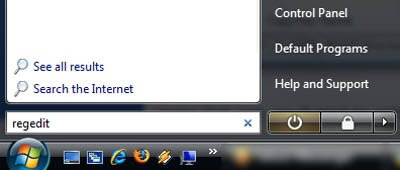
Step 1: Type regedit.exe in the Start menu search and browse to the following key:
HKEY_CLASSES_ROOT\Directory\Background\shell
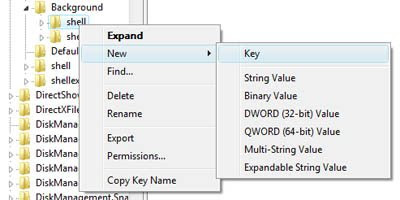
Step 2: Right-click on "shell" and create a new key called Control Panel.
Under that one right-click and create a new key called "command".
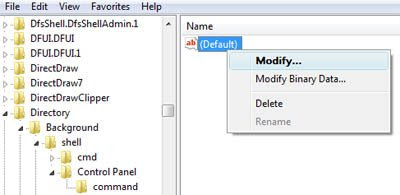
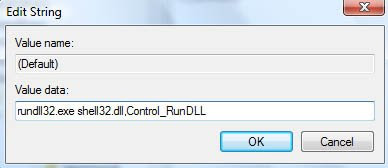
Step 3: Select the "command" key and then set the Default value on the right-hand side to:
rundll32.exe shell32.dll,Control_RunDLL
Step 4: After completing all the steps above you can see immediately the new item (Control Panel) in your right click menu item.
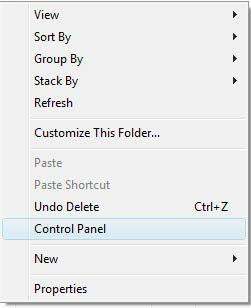
Hope this information was useful to you. I would be eagerly waiting for your comments. Thanks to Helpero for the information.
All you need to do is to modify the registry a bit.
Here are the steps that you will need to go through after which you will be done with getting Control Panel on your right click menu :
Step 1: Type regedit.exe in the Start menu search and browse to the following key:
HKEY_CLASSES_ROOT\Directory\Background\shell

Step 2: Right-click on "shell" and create a new key called Control Panel.
Under that one right-click and create a new key called "command".

Step 3: Select the "command" key and then set the Default value on the right-hand side to:
rundll32.exe shell32.dll,Control_RunDLL


Step 4: After completing all the steps above you can see immediately the new item (Control Panel) in your right click menu item.

Hope this information was useful to you. I would be eagerly waiting for your comments. Thanks to Helpero for the information.
Thursday, November 20, 2008
Budget Phone with 1.3 MP Cam by Virgin Mobile
Virgin Mobile has unveiled its vKewl mobile phone with Video Recording capability. The handset is, according to the company the only handset in its price range with a 1.3 mega pixel camera that comes with video recording capability, lifetime incoming validity and a prepaid connection. Other features also include an MP3 Player and an FM Radio.

M. A. Madhusudan, Chief Executive Officer, Virgin Mobile India said, "The mobile phone is a lifestyle device for youth and has become an extension of their personality and entertainment requirements. Keeping this in mind, we have now made facilities such as video recording and a 1.3 mega pixel camera more affordable for youth so that they can capture and share impromptu moments spent with their friends and family without hurting their pockets".
The handset comes equipped with a 1.8-inch TFT LCD sporting a 176 x 220 pixel resolution display with 262k colors. It comes with preloaded games, a microSD card slot for memory expansion, WAP and can also be used as a modem.The handset is priced at Rs. 3, 499.Source


M. A. Madhusudan, Chief Executive Officer, Virgin Mobile India said, "The mobile phone is a lifestyle device for youth and has become an extension of their personality and entertainment requirements. Keeping this in mind, we have now made facilities such as video recording and a 1.3 mega pixel camera more affordable for youth so that they can capture and share impromptu moments spent with their friends and family without hurting their pockets".
The handset comes equipped with a 1.8-inch TFT LCD sporting a 176 x 220 pixel resolution display with 262k colors. It comes with preloaded games, a microSD card slot for memory expansion, WAP and can also be used as a modem.The handset is priced at Rs. 3, 499.Source
Luxury Edition MOTOMING
The latest MOTO MING from Motorola, the A1600 packed with GPS capabilities, was launched in India last month. For some inane reason though, apparently not taking into considering the current state of the world’s economy, the company has recently unveiled a new version of the A1600, a Luxury Edition in Gold that, according to reports, comes with a Cartier business card holder.

The handset, that I’d like to call the Ming with Bling is available in Taiwan for an outrageous price of Rs. 42,995 ($867). I’m wondering if mobile manufacturers really get the word 'recession' with handsets like the INNOV8 and HTC Touch Pro being launched in the country.Source

The handset, that I’d like to call the Ming with Bling is available in Taiwan for an outrageous price of Rs. 42,995 ($867). I’m wondering if mobile manufacturers really get the word 'recession' with handsets like the INNOV8 and HTC Touch Pro being launched in the country.Source
Subscribe to:
Posts (Atom)